

In this article, we will learn how to index Json data on SQL Server to perform fast searches.
As we know, Json type data are actually string expressions and can be stored as NVARCHAR(Max) on SQL Server.
The biggest advantage of using Json is that it does not need to be in a structured format in a field and there is no need to make changes to the structure of the database when we want to keep more and different information in the future.
For example, while there is information about the material used in the cover of a product in a product list, there is no need for it in the other. You can add and go. When you want to query, you can only bring what is there.
So, how do we query data in Json format in SQL Server?
The Json commands that we can use with native T-SQL in SQL Server are as follows.
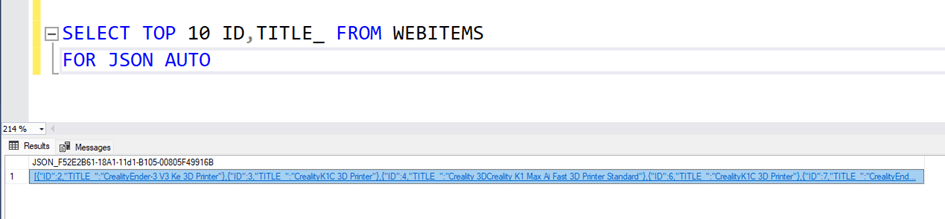
SELECT – FOR Clause
Used to return the output of a query in JSON format.
Example:
SELECT * FROM TableName FOR JSON AUTO;Returns TableName data in JSON format.
OPENJSON
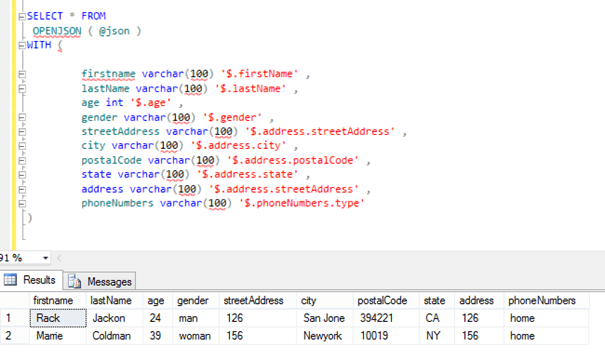
Transforms JSON data into SQL Server tables (presents it as chunks and rows/columns).
Example:
SELECT * FROM OPENJSON('{"id":1, "name":"John"}');
Returns JSON in a tabular format: key, value, type.

JSON Functions
What does it do? It includes several functions that make it easy to work with JSON data:
JSON_VALUE()
Used to return the value of a key in JSON. Can only return plain (scalar) values (e.g. number or text).
Usage Example:
SELECT JSON_VALUE('{"id":1, "name":"John"}', '$.name') AS Name;

Features:
Path: The JSON path ($) where the relevant value is located is specified.
It can only return plain values such as text, numbers, etc., it is not used to return objects or arrays.
JSON_QUERY()
Used to return more complex data, such as a subobject or array within JSON.
Example:
SELECT JSON_QUERY('{"id":1, "details":{"age":30, "city":" Newyork "}}', '$.details') AS Details;
Output : {“age”:30, “city”:”Newyork”}

Features:
Used to return an array or object.
Cannot be used for scalar values, JSON_VALUE() is preferred instead.
JSON_MODIFY()
Used to update JSON data, change a value, or add a new value.
Example:
SELECT JSON_MODIFY('{"id":1, "name":"John"}', '$.name', 'Jane') AS UpdatedJson;
Output : {“id”:1, “name”:”Jane”}

Features:
Replaces the value in the specified JSON path.
Can be used to add a new key.
Can be used to delete an existing key (by setting it to NULL).
Summary:
JSON_VALUE() : To get scalar values,
JSON_QUERY() : To get sub-objects or arrays,
JSON_MODIFY() : Used to update, add or delete JSON data.
ISJSON
Checks if a text is valid JSON.
Example:
SELECT ISJSON('{"key":"value"}') AS IsValidJSON; -- returns 1
Returns 1 if valid JSON, 0 otherwise.

JSON_OBJECT (Transact-SQL)
Creates a JSON object from key-value pairs.
Example:
SELECT JSON_OBJECT('id', 1, 'name', 'John') AS JsonObject;
Output : {“id”:1, “name”:”John”}
JSON_ARRAY
Creates an array in JSON format.
Example:
SELECT JSON_ARRAY(1, 'John', 3.14) AS JsonArray;
Output : [1, “John”, 3.14]

With these commands, we can create, edit, query and validate JSON data in SQL Server. JSON support makes it easier to integrate with applications and makes working with unstructured data efficient.
Now let’s talk about the index usage that we need when searching in a data containing JSON.
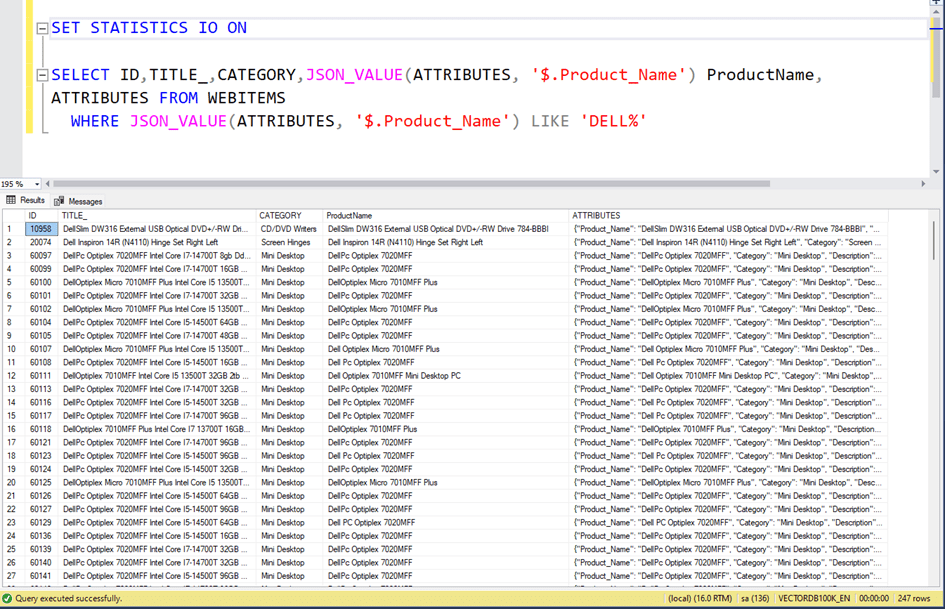
Now we have a dataset like this. 75,959 rows and Json data as an example.
{"Product_Name": "Dell Optiplex Micro 7010MFF Plus", "Category": "Mini Desktop", "Description": "The Dell Optiplex Micro 7010MFF Plus is a powerful mini desktop computer featuring Intel Core i5 13500T processor, 32GB DDR5 RAM, and 4TB SSD storage. It runs on Windows 11 Home operating system and comes in black color. is designed for professional use and offers wireless features, Bluetooth connectivity, and Intel UHD Graphics 770.", "Color": "Black", "Operating System": "Windows 11 Home", "Graphics Card Type": "Internal Video Card ", "Ram Type": "DDR5", "Processor Number": "13500T", "Wireless Feature": "Yes", "Bluetooth": "Yes"}

Here the ATTRIBUTES field is in json format and is kept as NVARCHAR(MAX).
Now, if we want to get products whose Product_Name property starts with ‘Dell%’ in json, we write a query like this. Here we use the JSON_VALUE function.
As you can see, 247 rows of data arrived.
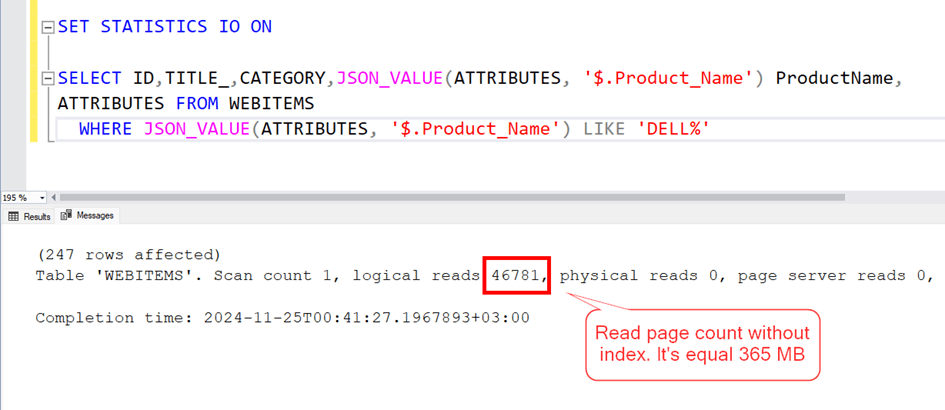
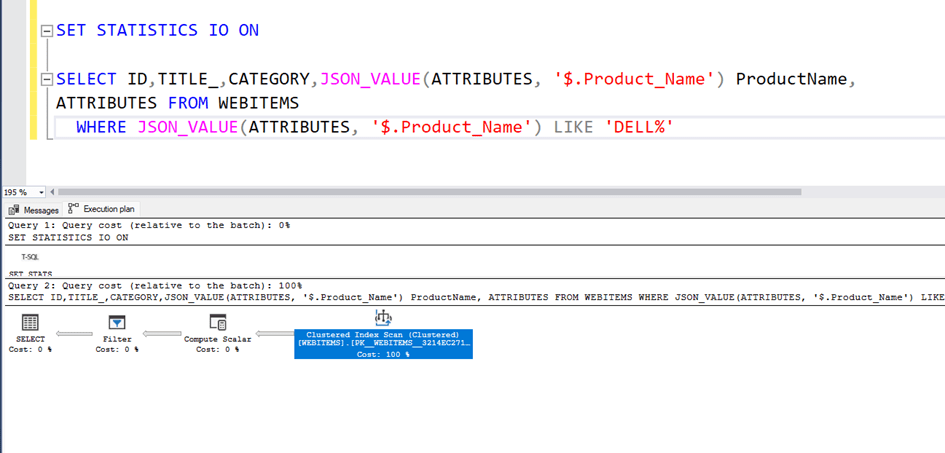
Now let’s look at the execution plan and read count.
As can be seen, the clustered index scans, that is, it scans the entire table, and the total number of pages it reads is 46781. Since each page is 8 KB, this corresponds to a reading of approximately 365 MB.
Now let’s try to put an index on this Json data.
Since Json data is text data, we cannot put an index directly. However, we can add a computed field here and put an index on this field.
For example, if we want to index the Product_Name information in Json,
We can add a field to the table. This field will be a computed field and will automatically get the value of Product_Name in the Json.
ALTER TABLE WEBITEMS
ADD Json_PRODUCTNAME AS JSON_VALUE ( ATTRIBUTES , '$.Product_Name' )

CREATE INDEX IX_JSON_PRODUCTNAME
ON WEBITEMS ( Json_PRODUCTNAME )
ALTER TABLE WEBITEMS
ADD Json_PRODUCTNAME AS JSON_VALUE ( ATTRIBUTES , ‘$.Product_Name’ )
Then we add an index to this field.
Now let’s look at our query performance. As you can see, this time it found the correct index and the number of reads dropped from 46781 to 771. A performance increase of approximately 60 times.

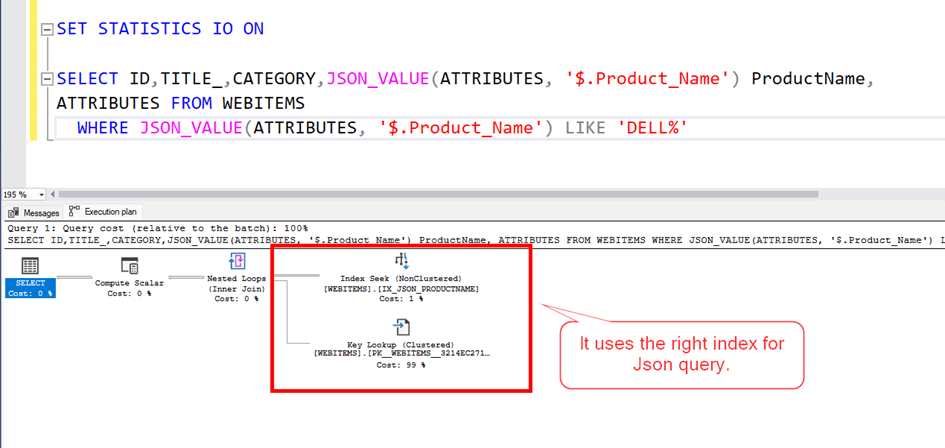
Here we can also use the calculated field we added as is.

Conclusion:
In this article, we learned how to query Json data when it is kept as NVARCHAR(max) in SQL Server and how to index Json data.
Hope to see you in another article…

 Ömer Çolakoğlu